
티스토리 뷰
728x90
https://wikidocs.net/book/7601
" 점프 투 스프링 " 을 통해 독학하고 있다 ..
2-03 JPA로 데이터베이스 사용하기 챕터를 하는 중 H2 데이터베이스 설치를 해도 404 에러가 뜨는 상황이 발생하였다 .
문제 상황
http://localhost:8080/h2-console브라우저에는 Whitelabel Error Page가 표시되었고,
서버 로그에는 다음과 같은 예외가 출력되었다.

설정 문제는 아니었다.
다음 설정들은 이미 올바르게 되어 있었다.
spring.h2.console.enabled=true
spring.h2.console.path=/h2-console
spring.datasource.url=jdbc:h2:~/local
또한 Gradle reuntimeClasspath를 확인한 결과, H2 의존성도 정상적으로 포함되어 있었다.
./gradlew dependencyInsight --dependency com.h2database:h2 --configuration runtimeClasspath-> com.h2database:h2 정상 확인
즉, 설정 및 의존성 누락 문제가 아님이 확정되었다.
결정적 단서 - Spring Boot 버전
애플리케이션 시작 로그에서 다음 문구를 발견했다.
:: Spring Boot :: (v4.0.1)
여기서 교재와의 차이가 드러났다.
- 교재 기준 : Spring Boot 3.x
- 현재 프로젝트 : Spring Boot 4.0.1
Spring Boot 4부터는 일부 개발 편의 기능 (H2 Console 등)이
기본 auto-configuration에서 분리되었고,
H2 웹 콘솔은 별도 모듈로 제공된다.
즉, Boot 3.x 까지는 :
runtimeOnly 'com.h2database:h2' 만 있어도 콘솔이 활성화
Boot 4.x 부터는 :
H2 콘솔을 명시적으로 추가해야 함
해결 방법 - h2console 모듈 추가
build.gradle에 다음 의존성을 추가했다.
dependencies {
    implementation 'org.springframework.boot:spring-boot-starter-web'
    implementation 'org.springframework.boot:spring-boot-h2console'

    runtimeOnly 'com.h2database:h2'
}
그 후 :
1. Gradle Reload
2. 서버 완전 재시작
해결 결과
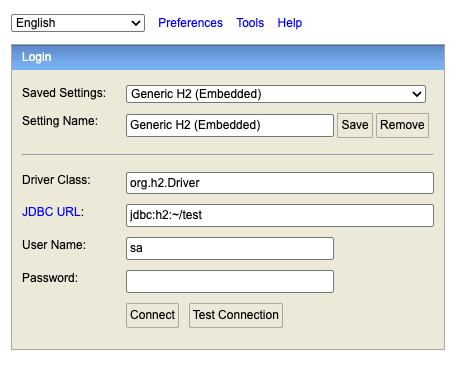
http://localhost:8080/h2-console
정리
- 에러 로그에서 정적 리소스 404를 통해 “서블릿 미등록”을 추론했고
- Spring Boot 배너에서 버전을 확인해 교재와의 차이를 인지했으며
- Boot 4.x에서 H2 Console이 별도 모듈이라는 점을 근거로 해결했다.
728x90
250x250
공지사항
최근에 올라온 글
최근에 달린 댓글
- Total
- Today
- Yesterday
링크
TAG
- 코랩 워드클라우드
- 이벤트에미터
- 프론트엔드
- 데이터옵션
- transformer
- 인스턴스 생명주기
- 코랩 한글깨짐
- 컴포넌트간통신
- ML
- NLP
- 리액트 폴더구조
- 코랩 워드클라우드 한글깨짐
- dl
- 컴포넌트간데이터전달
- PROMISE
- 리액트
- gradientclipping
- defaultparameter
- Await
- 인스턴스 옵션
- 로짓함수
- 이벤트유효성
- 자연어처리
- AI
- 콜백callback
- 인스턴스 구조
- KoELECTRA
- 사전학습모델
- async
- 사용자정의이벤트
| 일 | 월 | 화 | 수 | 목 | 금 | 토 |
|---|---|---|---|---|---|---|
| 1 | 2 | 3 | 4 | 5 | 6 | 7 |
| 8 | 9 | 10 | 11 | 12 | 13 | 14 |
| 15 | 16 | 17 | 18 | 19 | 20 | 21 |
| 22 | 23 | 24 | 25 | 26 | 27 | 28 |
글 보관함